
Download Enago Read – AI‑Powered Literature Management Software for Researchers
Overview
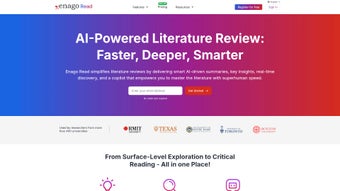
Enago Read is a cloud‑based, AI‑enhanced literature management platform designed specifically for academics, graduate students, and research professionals who must sift through an ever‑growing volume of scholarly articles. The service combines cutting‑edge natural‑language processing with a clean, browser‑first interface, allowing users to explore, organize, annotate, and summarize research material without ever leaving their web browser. When a PDF or DOI link is uploaded, Enago Read instantly extracts metadata, generates a concise, human‑readable abstract, and suggests related papers, datasets, and pre‑prints that match the user’s research focus.
The platform also includes a powerful tagging system, flexible reading lists, and drag‑and‑drop collections that keep multiple research projects distinct yet easily reachable. Collaboration is built into the core experience: team members can share collections, comment on highlights, and discuss findings in a shared workspace, turning a traditionally solitary task into a transparent, group‑driven workflow. An integrated Quiz Engine transforms highlighted passages into interactive questions, providing immediate feedback and deeper comprehension.
Whether you are drafting a systematic review, preparing a dissertation, or simply staying abreast of the latest developments in your field, Enago Read streamlines the entire literature review pipeline, reduces time‑to‑insight, and ensures that critical insights are never missed. The platform’s emphasis on security, real‑time sync, and cross‑device accessibility makes it a reliable partner for any modern research agenda.
Key Features & Workflow
- AI‑Generated Summaries: Instantly receive concise abstracts that capture objectives, methodology, results, and conclusions.
- Contextual Recommendations: The engine proposes related articles, datasets, and pre‑prints based on the current reading list.
- Pin & Annotate: Highlight text, add notes, and pin important excerpts to a personal sidebar for quick retrieval.
- Reading Lists & Collections: Organize papers into thematic groups, tag them with custom keywords, and reorder with drag‑and‑drop.
- Collaborative Workspace: Share collections, comment in real time, and track version changes across team members.
- Integrated Quiz Engine: Convert highlighted passages into multiple‑choice or open‑ended questions, complete with detailed explanations.
- Cross‑Platform Sync: All changes are saved to the cloud, ensuring seamless access from any device.
- Secure Data Handling: End‑to‑end encryption protects uploaded PDFs and personal annotations.
- Export Options: Export reading lists, annotations, and summaries to CSV, RIS, or plain text for citation managers.
The typical workflow begins with a simple import: drag a PDF into the browser window or paste a DOI link. Enago Read’s AI immediately parses the document, extracts key metadata, and presents a one‑sentence “quick take” summary. From this point, researchers can dive deeper by exploring suggested articles, adding the paper to a collection, or highlighting passages that merit further investigation.
When a paragraph is highlighted, the Quiz Engine can be triggered to generate practice questions that reinforce understanding and surface related concepts. Collaboration is as effortless as sharing a collection link; teammates receive instant access, can comment inline, suggest alternative tags, or merge duplicate entries. Because the platform runs entirely in the cloud, all edits are synchronized in real time across browsers, making it an ideal hub for distributed research teams.
The combination of AI summarization, smart recommendations, and a collaborative environment reduces the manual overhead traditionally associated with literature reviews, allowing scholars to allocate more time to analysis, writing, and discovery.
Installation, Usage & Compatibility
Enago Read is delivered as a fully hosted web application, which means there is no traditional installation process. Users simply navigate to EnagoRead.com, create a free account using an email address and password, and begin managing literature within seconds. The sign‑up flow also offers optional two‑factor authentication for enhanced security. Once logged in, the dashboard displays a tile‑based overview of reading lists, recent activity, and AI‑driven suggestions.
For users who prefer tighter integration with their browsing habits, Enago Read provides lightweight browser extensions for Chrome, Edge, and Firefox. These extensions add a “Save to Enago Read” button directly on publisher sites, academic databases (such as PubMed, IEEE Xplore, and Google Scholar), enabling one‑click import of articles without leaving the source page. Extensions auto‑update via the browser’s store and inherit the same privacy standards as the main platform.
Supported operating systems: Because Enago Read runs in any modern browser, it is compatible with Windows 10/11, macOS 12+, major Linux distributions, as well as mobile browsers on Android 9+ and iOS 13+. The responsive design ensures full functionality—including annotation, summarization, and collaboration—on tablets and smartphones, although the most efficient workflow is experienced on a desktop or laptop with a full‑size keyboard.
To maximize performance, we recommend using the latest versions of Chrome, Edge, or Firefox, as they provide optimal support for WebAssembly‑based AI inference that powers the summarization engine. Enago Read also integrates smoothly with reference managers such as Zotero, Mendeley, and EndNote via RIS/CSV import and export, allowing seamless migration of existing libraries. Users can export collections for offline citation management or import large bibliographies to instantly benefit from AI‑generated summaries across their entire dataset.
Conclusion: Pros, Cons, FAQ & Call‑to‑Action
Pros
- AI‑driven summaries drastically reduce time spent reading full papers.
- Contextual recommendations keep researchers up‑to‑date with emerging literature.
- Robust collaboration tools turn literature review into a team activity.
- Integrated Quiz Engine promotes active learning and deeper comprehension.
- Browser extensions enable one‑click import from most academic databases.
- Secure cloud storage with end‑to‑end encryption protects sensitive research.
- Cross‑platform accessibility from any modern browser.
Cons
- Full AI summarization is limited to the paid tier; free users receive only basic extracts.
- Heavy reliance on internet connectivity; offline mode is not currently available.
- Advanced customization of AI output (e.g., length, style) remains in beta.
- Learning curve for new users unfamiliar with AI‑assisted research tools.
Frequently Asked Questions
Is Enago Read free to use?
Enago Read offers a free tier that includes basic literature organization, highlighting, and limited AI summarization. To unlock full‑length AI‑generated abstracts, advanced collaboration features, and unlimited storage, users must upgrade to the Premium plan.
Can I import my existing reference library?
Yes. Enago Read supports RIS, CSV, and BibTeX import, allowing you to bring in collections from Zotero, Mendeley, EndNote, or any other reference manager. Once imported, the AI can generate summaries for each entry automatically.
How does the AI summarization work?
The platform uses a proprietary transformer‑based language model fine‑tuned on millions of scholarly articles. When you request a summary, the model extracts key sections—objective, methodology, results, and conclusion—and rewrites them into a concise paragraph while preserving technical accuracy.
Is my data secure?
Security is a top priority. All uploads are encrypted in transit (TLS 1.3) and at rest using AES‑256 encryption. Two‑factor authentication is available, and the platform complies with GDPR and CCPA standards.
Can I use Enago Read on mobile devices?
Absolutely. The responsive web app works on iOS Safari and Android Chrome. While the full annotation suite is optimized for desktop, the mobile interface still provides AI summaries, highlighting, and collaboration capabilities on the go.
In summary, Enago Read stands out as one of the most comprehensive AI‑enhanced literature management solutions available today. Its blend of automated summarization, smart recommendations, and collaborative workspaces directly addresses the core pain points of modern researchers—information overload, time constraints, and the need for seamless team knowledge sharing. While the free tier offers a solid introduction, serious scholars will find the Premium subscription a worthwhile investment for the productivity gains it delivers. If you’re ready to streamline your literature review workflow, stay current with the latest research, and transform passive reading into an interactive learning experience, download Enago Read now and elevate your research efficiency.
Review Summary
Pros: AI summaries, collaborative collections, quiz feature, secure cloud sync.
Cons: Limited offline capability, premium pricing for full AI features.



.png)



